All Things Techie With Huge, Unstructured, Intuitive Leaps

Blogger -- Image Upload Headaches with Google Chrome


I rarely shut my laptop down.  I have two versions of Eclipse running on it (one to run a Tomcat project) and one purely for Android that uses some of the Tomcat capabilities.  In addition, it acts as a MySQL server, and I read email and post to Twitter, and monitor various websites all at the same time.

A couple of days ago, Google Blogger image upload stopped working.  I couldn't upload an image to my blog.  Instead of the file selection box to pick an image from my computer, it says "In order to select an image from your online storage, please sign in".  I figured, what the heck, I will re-sign in with my Google credentials and see what happens.

 When I try to sign in, I get:
There was an error!
Details:
The feature you requested is currently unavailable. Please try again later.

I figured that this was a temporary thing.  I set it aside and for two days nada.  I finally decided to solve this this morning.  I shut down Chrome and restarted.  Nothing.  I rebooted the laptop.  Nothing.


I started Chrome, went to the three parallel bars in the corner, the menu and selected:

Tools > Clear Browsing Data
I cleared all of the browsing data, shut down Chrome, re-started it,
I then went to Settings and the content settings and enabled third party cookies.
 After all of that, it started to work again.  I can now upload images from my computer.

Hope this helps someone.

Nigerian Spammers Now Using RapidShare


RapidShare is now the spam platform of choice for Nigerian and African scam artists.  I had never heard of RapidShare so I went to their website:

Our Offer - simply smart

Whether you are at home, on the move or at work. It is now easier than ever to store, share and secure your data with RapidShare.
Being headquartered in Switzerland guarantees the highest data security and independence from foreign service providers.

The reason that I went to their website was that I got this email, and it wasn't in my spam folder:


Hello,
Sonia Abdul invites you to access the following file via RapidShare:
hi
HI
Message from Sonia Abdul:
Hello Friend

I am an Investor looking for patner. My name is Sonia,I need your collaboration in a partnership business in your country under your control as my business manager. I have $6.700.000 as my capital money,please for more details about this partnership investment contact me at my personal email soniaabdulmohamed@yahoo.com

Yours faithful, Sonia Abdul ( soniaabdulmohamed@yahoo.com )Hello Friend

I am an Investor looking for patner. My name is Sonia,I need your collaboration in a partnership business in your country under your control as my business manager. I have $6.700.000 as my capital money,please for more details about this partnership investment contact me at my personal email soniaabdulmohamed@yahoo.com

Yours faithful, Sonia Abdul ( soniaabdulmohamed@yahoo.com )
Now it is easier than ever to store, share, send and secure your data with RapidShare. RapidShare provides you with high-capacity, fail-safe servers. This enables you to access your favourite music, images and videos via the internet anywhere. RapidShare helps you stay organized - at home, on the move or at work.
Your RapidShare Team


There was a clickable link to access the file. Yeah right. 

I have some advice for RapidShare.com.  Your landing page said that 198,000 users used RapidShare yesterday.  I bet you that up to 99% of that traffic was for spam, or illegal distribution of music, videos and other IP and copyright infringement material, if traditional numbers for spam hold up.   You simply have no way of knowing, but I can garner an inkling of it, since I am the recipient of spam from your platform.


Tech Support Story

User: My usual password is not working suddenly. Why?

Tech Support: Your password has expired -- you must register a new one.

User: Why do I need a new one as that one was working fine?

Tech Support: You must get a new one as they automatically expire every 30 days.

User: Can I use the old one and just reregister it?

Tech Support: No, you must get a new one.

User: I don't want a new one as that is one more thing for me to remember.

Tech Support: Sorry, you must get a new one.

User: OK, roses

Tech Support: Sorry you must use more letters.

User: pretty roses

Tech Support: You must use at least one number.

User: 1 pretty rose

Tech Support: You cannot use blank spaces.

User: 1prettyrose

Tech Support: You must use additional letters.

User: 1fuckingprettyrose

Tech Support: You must use at least one capital letter.

User: 1FUCKINGprettyrose

Tech Support: You cannot use more than one capital letter in a row.

User: 1Fuckingprettyrose

Tech Support: You must use additional letters.

User: 1Fuckingprettyroseshovedupyourassifyoudon'tgivemeaccessrightfuckingnow

Tech Support: Sorry, that password is already being used.

Are You Too Old For IT? Repost From Information Week

Are You Too Old For IT? (via InformationWeek)
Ageism might be a taboo topic among employers, but veteran IT pros say it's very much an industry reality. It is illegal for employers to base hiring and firing decisions on a person's age. Explicit discrimination can be tricky to prove, however, and…

For the full post (this post is not a complete article) : http://www.informationweek.com/strategic-cio/team-building-and-staffing/are-you-too-old-for-it/d/d-id/1006268

For all of you Apple Developers out there


Just got this note from Apple:

iOS 7.1 beta now available.

iOS 7.1 beta and Xcode 5.1 Developer Preview are available on the iOS Dev Center. Download these new releases today and test your existing apps for compatibility
. 
Sign in to the iOS Dev Center

Using the Android Simulator Webview, with Localhost and Apache Tomcat

Okay, let's suppose that you are developing an Android app with server support.  Let's suppose that you are using the server to securely access a database and you are using JSPs to do it, since Android is Java and you know Java.  So using Tomcat (what else) to serve up the JSPs, you want to do the development running Tomcat on your computer.  When you fire up your simulator to test the webview app and try to access the web url using http://localhost:8080, nothing happens.

Why?  Because the simulator is using localhost.  127.0.0.1 doesn't work either.  The simulator acts as a router, so if you want to access http://localhost:8080/index.jsp the way that you would do it in a browser, the URL host in the activity has to appear as 10.0.2.2 as the IP address.  So in the above example, you would use http://10.0.2.2:8080/index.jsp.

If you are like me, you have a separate Eclipse for Android development.  You can either start Tomcat using the service control panel, or you can invoke both the Android Eclipse SDK and the JSP Eclipse SDK.  I don't try to combine the two with two separate projects just for simplicity sake.

And that brings us to last item of integrating webview with an Android app.  Suppose you have a webview page and you want to trigger an activity with a URL instead of going to another JSP.  Easy peasy.

In your activity where your webview is, find the following bit of code:

WebView webview = (WebView) findViewById(R.id.webview);
        webview.setWebViewClient(new WebViewClient() {
            @Override
            public boolean shouldOverrideUrlLoading(WebView view, String url) {
                view.loadUrl(url);
                return true;
            }
        });


This is a standard bit of code for displaying a URL from a web server in webview.  To make a url do an activity, you modify it easily.  The first thing that you do, is that you signal an activity in the URL.  One way is to construct the url like:   <a href="app://signal_activity">

Then modify the above method to catch that string:

 WebView webview = (WebView) findViewById(R.id.webview);
       webview.setWebViewClient(new WebViewClient() {
           @Override
           public boolean shouldOverrideUrlLoading(WebView view, String url) {
              // view.loadUrl(url);
            if (url.contains("app://signal_activity")){
                    
                   //trigger an Android action...,

               return true;
            }
            return super.shouldOverrideUrlLoading(view, url); 
           }
       });

There you go -- everything that you need to know to (1) use your local machine as the web server (2) use Tomcat to serve up the web stuff for the Android web view (3) use your Android simulator with your local machine and (4) integrate web pages with Android activities.

Hope this helps.

New XCode Seed Available for Apple Developers

New Xcode Download Available
Xcode 5.0.2 GM Seed
headershadow
This is a pre-release version
 of the complete Xcode developer toolset
 for Mac, iPhone, iPod touch,
and iPad. It includes the iOS 7.0.3 SDK
 and OS X 10.9 SDK. Xcode 5
 requires OS X 10.8.4 or later.


Just got this notice this evening in my mailbox.  New version of XCode available for download.

Another Google Software Bug on Blogger

I like the Google Blogger platform, but as smart as the geeks at Google are, it is somewhat gratifying to see that even the mighty Google has software bugs.  It makes me feel downright self-righteous and happy when I discover a Google Software bug, because I know that I am not alone in creating bugs.

I haven't posted here for 4 days, because I have been busy, and then this blogging platform has been hit by a bug.  I try to upload a picture from my computer to my blog, and I get this black window saying "In order to select an item from your online storage, please sign in".  WTF?  Who said anything about online storage.  I want to upload a pic from my computer.

Nothing seems to fix it but waiting it out under some brainiac at Google finds out that their precious software isn't working as it should.

Sometimes it takes awhile.  The only cure is to wait it out until Google fixes it.

DiscountApp Browser Hijack


It all started out when I noticed that there was a space on my Twitter homepage between the header and the top of the browser.  I could see more of my background image, and the side panel with my stats was much lower.  I initially thought that it was some weird Twitter thing.  It became supremely annoying.

Then I noticed that there was a little link in the space.  It was obvious that an ad was not rendering.  I thought that perhaps Twitter was going the ad placement route in advance of their IPO.

But there was another funny as well.  YouTube kept auto refreshing and I had these black patches of ads not rendering.  It was time to investigate.

I went back to Twitter and clicked on the little barely visible link, and was taken to the discountApp site.  There they explained that they were a browser extension, and they delivered ads not associated with the site.  I clicked on my Chrome Settings, found Tools, and then my Extensions, and sure enough they embedded a browser extension without my knowledge.  I deep-sixed it.  Quite frankly they were:
Scum-sucking Browser Hijackers
They had wombat piss for brains.
Total Scum of the Earth.

Can you tell that I was mad.  Let me tell you, this is one startup doomed to failure with unethical practices like that.  So if you are wondering what the big space is on your twitter page or why youtube keeps flashing black, it is because of that web STD called discountApp.


Google Chrome Pages Unresponsive Problem

Chrome has lost its shine for me.  I just wasted a few hours trying to get my wife's machine running.  She is not a heavy internet user and uses it primarily for email, the odd Skype chat and streaming a radio station.  So yesterday, Chrome started to misbehave.  It simply wouldn't work.  The picture above showed with the message:

The following page(s) have become unresponsive.  You can wait for them to become responsive or kill them.

So what to do.  At first I thought it was the machine.  It is an old one with Vista and Celeron processor.  I ran a registry cleaner.  I cleaned out the cache and cookies.  When that didn't work, I uninstalled Chrome, and re-installed.  Then it wouldn't even start.  I uninstalled it again, and ran the best virus and malware program that I have.  It ran all night.  Nada.  The machine was clean.

I tried Internet Explorer.  It worked just fine and relatively fast.  I suspected that Google made an update to Chrome.  I spent an hour or two Googling.  A Google site suggested that I navigate to %LOCALAPPDATA%\Google\Chrome\User Data\  and change Default folder name to backup Default.  Nothing.

Another suggestion was to append --no-sandbox in the shortcut panel to the command line.  Nada again.

I was just about to give up, when I tried this one last thing:

  • Right click google chrome shortcut.
  • Click on properties menu itme.
  • Click shortcut tab in the opened panel.
  • add this in target destination --disable-hang-monitor
to make it look like this:
"C:\Program Files\Google\Chrome\Application\chrome.exe" --disable-hang-monitor

This made Google Chrome work again.  But it sure took the shine off of Chrome for me.

Android Device Not Visible In Eclipse using USB cable


I wanted to connect a Galaxy Tablet by Samsung to my Eclipse Android SDK with the USB cable.  I downloaded the appropriate drivers, followed all of the instructions including setting the tablet in Application debug mode, and still nothing.  Nada! Zilch!  I thought that maybe I had the wrong driver, so I uninstalled the driver, went to the Samsung site, and got the driver again and installed it.  Nothing!  Crapola!

I have more than one Android app on the go, because the app that I am developing is quite complex, so I prototype each function as a separate project to make sure that I have the Java code right.  I went to another project and look at the run configs, and I could see the device in the run configuration menu.  It ran perfectly.  So, WTH?

After much wailing and gnashing of teeth, I decided to examine LogCat very closely.  It said it couldn't find a compatible minimum SDK version device attached.  Well, I did know where it was specified and that was in the AndroidManifest.xml.  So I went there and sure enough, I had accidentally changed the minSdkVersion to 17, instead of 8.  The 17 number was for the targetSdkVersion.


<uses-sdk
        android:minSdkVersion="8"
        android:targetSdkVersion="17" />

When I changed the minSdkVersion back to 8, I could see the USB connected device.

Hope this helps someone.

Windows 7, Build 7600, This Copy of Windows is not genuine


I have a Windows 7 laptop.  Generally I am pretty pleased with it.  Not as pleased as XP, but much more pleased than that claptrap piece of junk called Vista.  Windows 7 still craps out occasionally, but a reboot (sometimes removing the batteries to do so) fixes whatever ails it.  However, I got a shocker the other day.  After re-booting, it told me that my copy of Windows was not genuine.  Windows 7, Build 7600, This Copy of Windows is not genuine.  What the hell?

Well it turned out that the fix was relatively easy, but still disconcerting.  Click on the start menu. Open up All Programs > Accessories.  Right click on Command Prompt and click on Run As Administrator.

In the command window, type in:  slmgr -rearm

That should fix it.  Another reason to think that Microsoft is a buggy piece of crap.

Really Bummed Over Disk Corruption, MacBook Pro

So what I thought was my lovely MacBook Pro, is just another stinking piece of silicon.  While using Safari, noticed that when you put the cursor on the desktop, you continuous got the spinny colored wheel.  Safari stopped responding   I shut down and when I re-started, the damn thing wouldn't boot.  I got the white screen and the Apple logo, and the gray spinny thing, but no boot.

I booted in single user mode (command + S) and got a shell.  I typed in the fsck command (fsck -fy) and it blithely told me that the hard disk could not be repaired.  Reason:  Keys were out of order.  I could traverse the file directory, and my work was all there (/Volumes/Macintosh HD/ and then to the users directory and my name).

No problem, I shut down, and started the Disk Recovery Boot sector (restart while holding down command + R).  I started the disk utilities, and was quite certain that disk utilities First Aid would fix it.  I scanned the disk and sure enough, it told me that I needed to hit repair because the B-Tree was corrupt and keys were out of order.  I eagerly hit the Repair Disk button and that was the beginning of several wasted hours.  It couldn't fix the disk.  The utility does let you download a n

What to do.  I have an external hard drive, essentially doing nothing.  So, what I was going to do, is just copy the files that I wanted to an external drive.  Well, you can't mount external drives in single user mode.
 I reformatted it with same Disk Utilities and did a raw copy by dragging the Macintosh HD dead disk into the source and dragging the newly formatted disk into the target.  It copied.  Great! - now I had copy of my work (and the entire Mac hard drive -- it was a bit external drive).  The next step was open a terminal in the Disk Recovery Boot mode.  My plan was to copy the files that I need from the external disk /Volumes/nameOfExternalDisk to another disk for my archives.  The terminal could see and mount the other disk, but I couldn't mount the copy of the disk that I had just raw copied on the hard drive.

Well, I know how to force mount, so I did a df and the missing disk was /dev/disk2.  After creating a mount point, I issued a mount, and Voila -- disk utilities now saw it as a mounted disk.  Unfortunately the terminal in /Volumes/mountPoint didn't.  I ran the repair disk a few million times, all to no avail.

Then I had the bright idea of blowing back the mounted external image on the mac hard drive.  Maybe it would fix something.  It didn't.  However in single user mode, the data was all there.  The disconcerting factor was that I had blown it back from a 3 TB external hard drive, and now Disk Utilities thought that there was three terabytes on my Mac hard drive.  There isn't.  Single User mode still lets me explore and look at my data from the terminal, but like a super autistic kid, the data won't come out.

Someone suggested Disk Warrior.  They say it works magic.  This was my first foray into Mac and initially I was very very pleased with the experience.  I am totally soured on it now.  My mistake was thinking that I wouldn't have to back up my dev on the Mac until I was finished.  It was a new Mac, and they don't go kaput in the first few months.  The real piss-off, is that the Mac engineers aren't as smart as the Disk Warrior guys, and that the inbred Mac Disk Utilities aren't as smart as Disk Warrior.  If Steve Jobs were alive, I could taunt him and it would be fixed.  Now I just rant in my blog.

Western Digital SmartWare Review


My very first 1 Terrabyte External Storage disk drive was a Western Digital.  That was many moons ago.  I was pleased with the price, the performance and even the ruggedness.  It is a bit clunky in design, but when I accidentally dropped it and cracked a bit of the plastic, my heart sank.  That was several years ago.  I plugged it back in, and it works fine to this day.

So I go to my local Future Shop and see a Western Digital 3 Terabyte drive for $129.  I snap it up.  It still has the same clunky design, but hey three terabytes for just over a hundred bucks -- such a deal!  I love Moores Law.

I unpacked it and it said that there was automagic backup software called SmartWare.  It would take all of the work of backups out of my hands.  I thought "what the heck" and installed it.  I was impressed that it started classifying my half terabyte laptop disk, and five hours later, it was all classified and backed up.  No big whoop.  I started the backup before going to bed at the crack of dawn.

Well sir or madam, when I next rebooted the computer, it was excruciating slow to boot. It was excruciating slow to kick Skype (I manage a coding team remotely).  Opening a spreadsheet was slow.  I thought WTF - the only thing that changed was the addition of the SmartWare.  I checked to make sure that I hadn't picked up a virus or bot.  I was clean so it had to be the backup software.

I uninstalled and my computer returned to normal speed.  I haven't decided whether to do the backups manually from now or, or to install and uninstall it after backups.  I am inclined to go manual, because another weird thing happened after the uninstall, but that is a different blog entry.  Later.

When Yahoo is in doubt, it copies Google

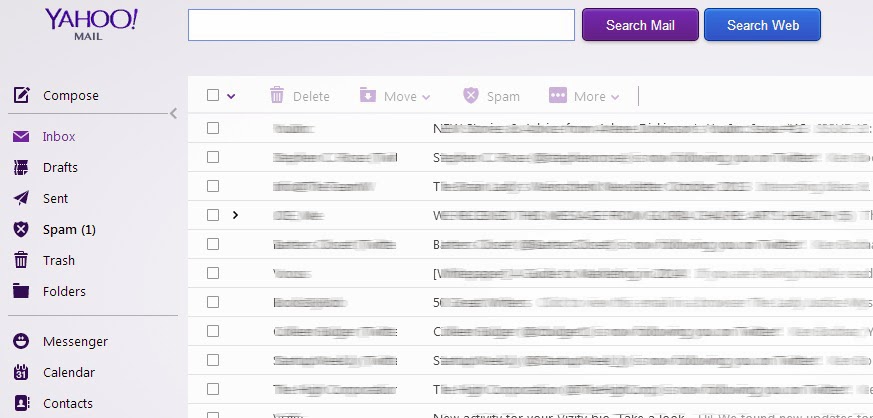
 (Doesn't Yahoo Mail look suspiciously like Google's Gmail below?)

When Marissa Mayer was hired to turn around Yahoo, one of the first things that she did (other than whelping some progeny) was to bring in all of the remote workers.  That was supposed to be a big turnaround move.

Apparently the next step is to re-face Yahoo mail which happened recently.  So they copied the highly successful Gmail.  If it wasn't for the branding, you couldn't tell the difference, other than the colors are reversed - white for messages and light blue for background and vice versa.

So how much are they paying Ms. Mayer.  I am sure that I could have done the same with half of her salary.  All right you Yahoos, get yer fat-ass derrieres back in the office and lets copy Google.  Hey, I could be an extremely high paid tech exec.

Imitation is the sincerest form of flattery, but it also could be the final form of desperation.  You can quote me on that.